15 AI Tools Every Architect Should Know in 2026
Tested, Explained and Ready to Use
Who Is This Guide For?
This guide serves anyone using or considering AI tools in architectural practice or education.
🎓
Architecture Students
Struggling to keep up with fast-changing digital tools? This guide shows you exactly which AI tools to learn first so you enter the workforce ready..
🏗️
Practising Architects
Spending too many hours on repetitive tasks? Discover how AI can cut your documentation and rendering time without changing your core workflow.
🏢
Architecture Firm Owners
Want to improve studio output without hiring more staff? This guide maps the AI tools that have the highest ROI for small and mid-size practices.
🌐
Design Educators
Teaching the next generation? Use this guide to build an AI literacy curriculum that prepares students for real-world practice in 2026.
Quick Navigation
Jump to the section most relevant to you.
| 1️⃣ Why AI Matters for Architects The case for adopting AI now — with data on time savings and market shifts. | 2️⃣ AI Research Tools Tools that speed up site analysis, precedent research and project briefs. |
| 3️⃣ AI Concept Design Tools Generate, explore and refine design concepts faster than ever. | 4️⃣ AI Rendering Tools Produce photorealistic visuals at a fraction of the traditional time. |
| 5️⃣ AI Documentation Tools Automate specs, reports and compliance documents intelligently. | 6️⃣ AI Productivity Tools Tools that handle scheduling, emails, meeting summaries and admin. |
| 7️⃣ AI Workflow Integration Build a connected AI stack that works across your whole practice. | 8️⃣ Ethical Use of AI Copyright, authorship, client disclosure and professional responsibility. |
| 9️⃣ Common AI Mistakes The errors architects make with AI and how to avoid every one of them. | 🔟 Building Your AI Workflow Your step-by-step plan to adopt AI in the next 30 days. |
Section 1: Why AI Matters for Architects
AI tools for architects are transforming how practices operate around the world. Whether you work in Mumbai, Dubai, Berlin, or Sydney, the pressure to deliver more — faster and with smaller teams — is the same. AI is not a replacement for architectural thinking. It is a force multiplier.
1.1 The Time Problem Architects Face
Studies from the American Institute of Architects and RIBA show that architects spend less than 30% of their working hours on actual design. The rest is consumed by documentation, client communication, coordination and administrative tasks. AI targets that 70% directly.
💡 CALLOUT
ARCHITECT TIME AUDIT (Global Average) Design and Concept Development: 28% Documentation and Drawings: 31% Client Communication and Meetings: 18% Project Coordination: 14% Business and Admin: 9% AI can meaningfully reduce time spent in the last four categories.
1.2 How AI Is Already Changing Architecture Globally
In Singapore, firms like WOHA use generative AI to test passive ventilation strategies across dozens of massing options in hours. In the Netherlands, parametric AI tools helped design Amsterdam’s new riverside housing blocks at a density previously impossible to calculate manually. In India, startups are using AI-powered floor plan generators to make affordable housing design faster for developers.
✅ TIP
If you are unsure where to start with AI, begin by identifying your single most time-consuming weekly task. That is where AI will deliver the fastest return.
1.3 The AI Adoption Maturity Scale for Architects
| Level | Stage | What You Are Doing |
| 1 | Curious | You have heard of AI but have not tried any tools yet. |
| 2 | Explorer | You have tested ChatGPT or Midjourney at least once. |
| 3 | Adopter | You use one or two AI tools regularly in your workflow. |
| 4 | Integrator | You have a connected AI stack covering multiple tasks. |
| 5 | Leader | You are building AI into your firm’s systems and training your team. |
1.4 What AI Cannot Replace
AI cannot replace spatial empathy. It cannot understand why a family needs a courtyard, why a hospital corridor needs to feel calm, or why a community plaza needs to hold cultural memory. It can help you get there faster. But the insight behind great architecture still belongs to you.
⚠️ WARNING
Do not confuse AI speed with AI quality. A fast rendering of a bad design is still a bad design. Use AI to explore more options, not to skip the thinking.
1.5 The Market Signal Architects Cannot Ignore
McKinsey’s 2025 Global AI Index reports that 68% of architecture and engineering firms globally are already using AI in some part of their workflow. Clients in Southeast Asia and the Middle East increasingly expect AI-enhanced visualizations as a standard deliverable. Architects who are not using AI tools risk appearing behind the times — and losing pitches to firms that are.
Section 2: AI Research Tools
Research is the invisible foundation of every great project. AI research tools help architects gather precedents, analyse sites, synthesize regulations and brief clients — in a fraction of the traditional time.
2.1 ChatGPT and Claude for Architectural Research
Both ChatGPT (OpenAI) and Claude (Anthropic) are large language models that work like a highly intelligent research assistant. You can ask them to summarize climate data for a site in Chennai, explain the difference between EDGE and LEED certification, or draft a project brief from your bullet-point notes. The key is learning to write precise prompts.
✅ TIP
Architect Research Prompt Template: “You are an architecture researcher. I am designing a [building type] in [city/climate]. Summarize: 1) key climate considerations, 2) three relevant precedent projects, 3) common client expectations in this context. Be specific and concise.”
2.2 Perplexity AI for Real-Time Research
Unlike ChatGPT, Perplexity AI searches the live web and cites its sources. This makes it ideal for current building regulations, material costs, planning policy changes, and recent case studies. Architects in Australia and the UK have found it particularly useful for keeping up with NCC and building regulation updates.
2.3 Consensus and Elicit for Evidence-Based Research
These tools search academic databases and return evidence from peer-reviewed papers. For architects working in health, education or aged care — where environmental research directly affects design decisions — these tools surface the science behind daylight standards, acoustic performance and thermal comfort in minutes rather than days.
💡 CALLOUT
KEY AI RESEARCH TOOLS FOR ARCHITECTS ChatGPT / Claude — Project briefs, research summaries, prompt-based analysis Perplexity AI — Current regulations, live web research with citations Consensus — Academic evidence on building science topics Elicit — Research synthesis for health and education projects NotebookLM — Upload your project documents and ask questions about them
2.4 NotebookLM for Project Knowledge Management
Google’s NotebookLM allows you to upload PDFs of your project documents, client briefs, reports and reference books, then ask questions across all of them. It reads your documents, not the whole internet. This makes it ideal for large, complex projects with significant reference material.
2.5 AI Time Saving in Research Phase
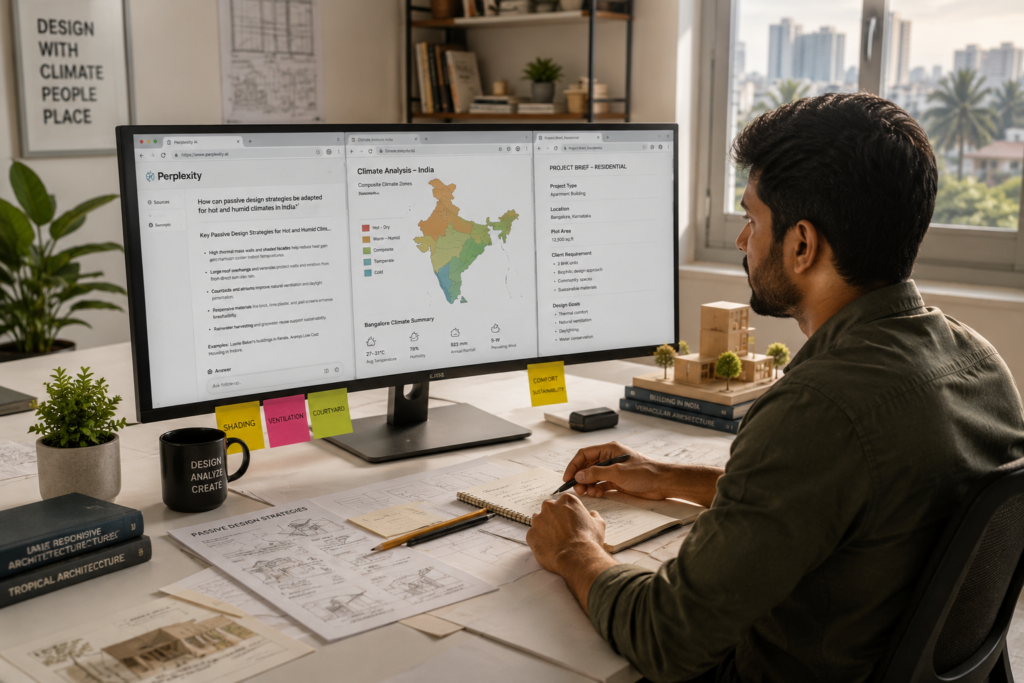
A typical site analysis and precedent research phase that takes 2–3 days manually can be compressed to 4–6 hours with the right AI research tools. The time is not just saved — it is reinvested into design thinking. Here is the time saving matrix for research tasks:
| Research Task | Manual Time | With AI | Time Saved |
| Site climate research | 1–2 days | 2–3 hours | 80% |
| Precedent study (5 projects) | 3–4 days | 4–6 hours | 75% |
| Building code summary | Half day | 30–45 mins | 85% |
| Project brief drafting | 4–6 hours | 45–60 mins | 75% |
| Material specification research | 1 day | 2–3 hours | 70% |
Section 3: AI Concept Design Tools
The concept phase is where architectural ideas are born. AI concept tools do not generate your ideas — they help you explore more of them, faster. The goal is to increase the range of options you consider before committing to a direction.
3.1 Midjourney for Concept Mood and Image
Midjourney is an AI image generator that produces stunning architectural visualizations from text prompts. Architects use it in the early concept phase to generate mood images, explore material palettes, and test massing characters. A firm in Dubai used Midjourney to generate 40 exterior concept options in two hours — work that would have taken a team of five three days of SketchUp modeling.
⚠️ WARNING
Midjourney images are not working drawings. They cannot show accurate dimensions, structural logic or buildability. Use them to inspire and communicate mood — not to claim a design is resolved.
3.2 Adobe Firefly for Design Iteration
Adobe Firefly integrates directly into Photoshop and InDesign, which most architects already use. Its ‘generative fill’ feature allows you to change materials on an existing image, extend a facade, or add context like trees and people to a building photo. It is particularly useful for client presentations where you need multiple material options quickly.
✅ TIP
Use Adobe Firefly’s generative fill to create three material variations of the same facade image in minutes. Show your clients options without rebuilding your 3D model.
3.3 Spline and Vizcom for 3D Concept Sketching
Spline is a browser-based 3D design tool with AI-assisted object generation. Vizcom takes your hand-drawn architectural sketch and transforms it into a photorealistic architectural image in seconds. These tools are particularly popular with architecture students in Southeast Asia and India who want to quickly visualize early concepts without building full BIM models.
💡 CALLOUT
ARCHITECT AI CONCEPT STACK Midjourney — Mood boards, facade character, concept imagery Adobe Firefly — Material variations, context additions, presentation images Vizcom — Hand sketch to rendered concept in seconds Spline — Browser-based 3D concept exploration DALL-E 3 (via ChatGPT) — Diagrammatic concept studies
3.4 AI-Assisted Floor Plan Generation
Tools like Planner 5D, ARCHITEChTURES and Maket.ai use AI to generate floor plan options from basic inputs like area, number of rooms and building type. They are not replacements for architectural design — but they are powerful tools for rapidly exploring spatial configurations, especially for residential typologies. An architecture firm in Bangalore used Maket.ai to generate 12 apartment layout options for a developer client in under an hour.
3.5 Generative Design with Autodesk Forma
Autodesk Forma (previously Spacemaker) uses AI to analyze and generate urban-scale massing options based on constraints like sun access, wind comfort, views and FAR. Firms in Scandinavia were early adopters. Now practices in Singapore, Australia and South Korea are using it for masterplan and mixed-use projects. It connects directly to Revit.
Section 4: AI Rendering Tools
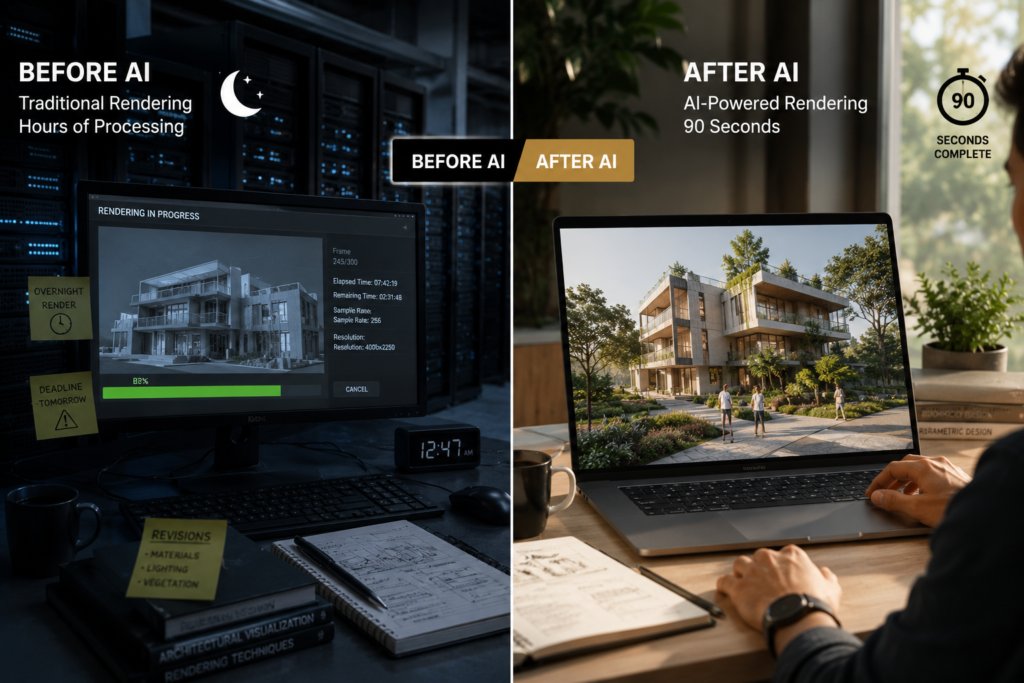
Rendering is where many architectural practices spend enormous time and money. AI rendering tools are changing this faster than any other area of the discipline. What once took a specialist renderer two days now takes two hours — or two minutes.
4.1 Veras (EvolveLAB) for Revit and SketchUp Rendering
Veras integrates directly into Revit and SketchUp and uses AI to produce photorealistic renders from your existing model in seconds. Unlike traditional renderers, you do not need to set up lighting rigs, material libraries or camera angles in complex settings. You describe the mood in plain language and the AI interprets it. A medium-size practice in Melbourne reported saving 12 hours per project on visualization using Veras.
4.2 Lumion AI for Real-Time Architectural Visualization
Lumion has integrated AI-assisted scene building and sky generation into its platform. Architects import their models and Lumion populates context — trees, people, cars, weather — automatically. The AI sky generator matches your design’s climate and context with photorealistic accuracy. It is particularly popular in the Middle East and India where fast client turnaround on visualizations is expected.
✅ TIP
Use Lumion’s AI sky matching feature to produce morning, midday, and evening renders of the same scene automatically. Three deliverables from one setup.
4.3 Stable Diffusion and ControlNet for Custom Renders
Advanced users are using Stable Diffusion with ControlNet — an open-source AI image generation tool — to transform architectural line drawings and 3D screenshots into rendered images. The key advantage: it is free and infinitely customizable. Architecture schools in Europe and North America are adding it to their digital tools curriculum. The learning curve is steeper than commercial tools but the control is unmatched.
4.4 Enscape with AI Enhancement
Enscape is a real-time rendering plugin for Revit, SketchUp, Rhino and ArchiCAD. Its AI-assisted material recognition automatically assigns realistic materials to imported models and intelligently improves render quality based on your hardware. It is one of the most widely used rendering tools in professional architecture practice globally.
💡 CALLOUT
In India, the number of registered architects has grown faster than the number of large firms hiring them, pushing many graduates toward freelance work, technology roles, or hybrid careers within their first five years.
4.5 AI Rendering Workflow for a Typical Project
A well-structured AI rendering workflow for a residential project looks like this: concept sketches in Vizcom, massing test renders in Midjourney, model-based presentation renders in Veras or Enscape, and final marketing renders in Lumion. Each tool serves a different phase and a different level of resolution. Using all four is not inefficient — it is strategic.
Section 5: AI Documentation Tools
Documentation is the part of architecture that no one celebrates — and that consumes the most unbillable hours. AI documentation tools are closing the gap between design time and drawing time. The best ones integrate directly into BIM workflows.
5.1 ChatGPT for Specification Writing
Specification writing is time-consuming, repetitive and detail-critical. ChatGPT can draft full NatSpec, NBS or CSI MasterFormat sections from your outline notes. You provide the product information, performance requirements and climate context. The AI produces a structured draft that your team reviews and finalizes. A Sydney firm reduced specification writing time by 60% using this approach.
⚠️ WARNING
Always review and verify every AI-generated specification against current local standards and manufacturer’s data sheets. AI can produce plausible but technically incorrect specifications, especially for structural or fire-rating requirements.
5.2 Otter.ai and Fireflies.ai for Meeting Documentation
These tools record, transcribe and summarize client meetings automatically. Otter.ai creates a searchable transcript and highlights action items. Fireflies.ai goes further, generating meeting summaries organized by decision, action and question. For firms managing multiple projects, this alone can save 2–3 hours per week.
💡 CALLOUT
AI DOCUMENTATION TOOLS — QUICK REFERENCE ChatGPT / Claude — Spec writing, report drafting, letter templates Otter.ai — Meeting transcription and action item extraction Fireflies.ai — Meeting summaries with decision and action tagging Adobe Acrobat AI — PDF review, comment extraction, comparison Notion AI — Project documentation, SOPs, team knowledge bases
5.3 Notion AI for Project Documentation
Notion AI sits inside your project management workspace and helps you write briefing documents, design rationale statements, handover notes and team SOPs. It learns from your existing documentation style and can auto-complete meeting notes from bullet point inputs. Architecture firms in Germany and the Netherlands have built entire project knowledge systems on Notion with AI assistance.
5.4 Adobe Acrobat AI for Contract and PDF Review
Adobe Acrobat’s AI assistant allows you to ask questions about long PDF documents — contracts, engineering reports, survey documents. You can ask: ‘What are the key structural constraints from this geotechnical report?’ and receive a precise, cited summary. This is transformative for contract administration where review time is a significant cost.
5.5 AI for Drawing Sheet Compliance Checking
Emerging tools like Archistar and ALICE Technologies use AI to check designs against planning codes and building regulations automatically. Archistar is widely used in Australia to evaluate development potential against planning overlays. These tools are still evolving but represent the future of automated compliance review.
✅ TIP
Combine Notion AI for project documentation with Otter.ai for meeting records. Together, they create a searchable, organized project knowledge base that any team member can query in seconds.
Section 6: AI Productivity Tools
Architects are knowledge workers. And knowledge work is increasingly assisted by AI tools that handle the routine, repetitive and administrative tasks — freeing architects to do more of what only humans can do well.

6.1 Microsoft Copilot for Office-Embedded AI
Microsoft Copilot is embedded in Word, Excel, PowerPoint, Outlook and Teams. For architecture firms already using Microsoft 365, it adds AI to every tool in the stack. Copilot can draft fee proposals in Word, analyze project cost data in Excel, summarize email threads in Outlook, and create presentation slides from your design rationale documents.
6.2 Grammarly and Hemingway for Client Communication
Architectural writing — project descriptions, award submissions, fee proposals, design statements — must be clear, credible and compelling. Grammarly’s AI checks grammar, tone and clarity in real time. Hemingway Editor highlights overly complex sentences. Together, they make client-facing documents more readable. This matters more than ever in a global practice where you may be communicating with clients in their second or third language.
✅ TIP
Run every client-facing document through Hemingway before sending. Aim for Grade 8 readability. Complex sentences and passive voice cost you credibility with clients who are reading quickly.
6.3 Motion and Reclaim.ai for Schedule Management
These AI calendar tools analyze your tasks, deadlines and meeting schedule, then automatically plan your week to protect deep work time. Motion reschedules incomplete tasks automatically when your day shifts. For architects managing multiple projects simultaneously, this kind of intelligent scheduling can prevent the constant context-switching that kills productivity.
💡 CALLOUT
AI PRODUCTIVITY STACK FOR ARCHITECTS Microsoft Copilot — Office suite AI across Word, Excel, Outlook Grammarly Business — Client communications and professional writing Notion AI — Project documentation and knowledge management Motion / Reclaim.ai — Intelligent schedule and task management Zapier / Make — Workflow automation between apps
6.4 Zapier and Make for Workflow Automation
Zapier and Make (formerly Integromat) are workflow automation platforms that connect your apps without coding. An architecture firm in London built an automated workflow that: receives a client enquiry by email → creates a new project in their CRM → generates a project folder in Google Drive → sends an AI-drafted acknowledgment email → adds a follow-up task to their project management app. All without a human touching a keyboard.
6.5 Loom AI for Asynchronous Communication
Loom lets you record screen and camera video messages for clients and team members. Its AI feature generates automatic transcripts, summaries and chapter markers. For architects with international clients across time zones — common for firms based in India serving UK or Middle East clients — Loom AI replaces many synchronous meetings with clear, recorded communications that clients can review at their convenience.
Section 7: AI Workflow Integration
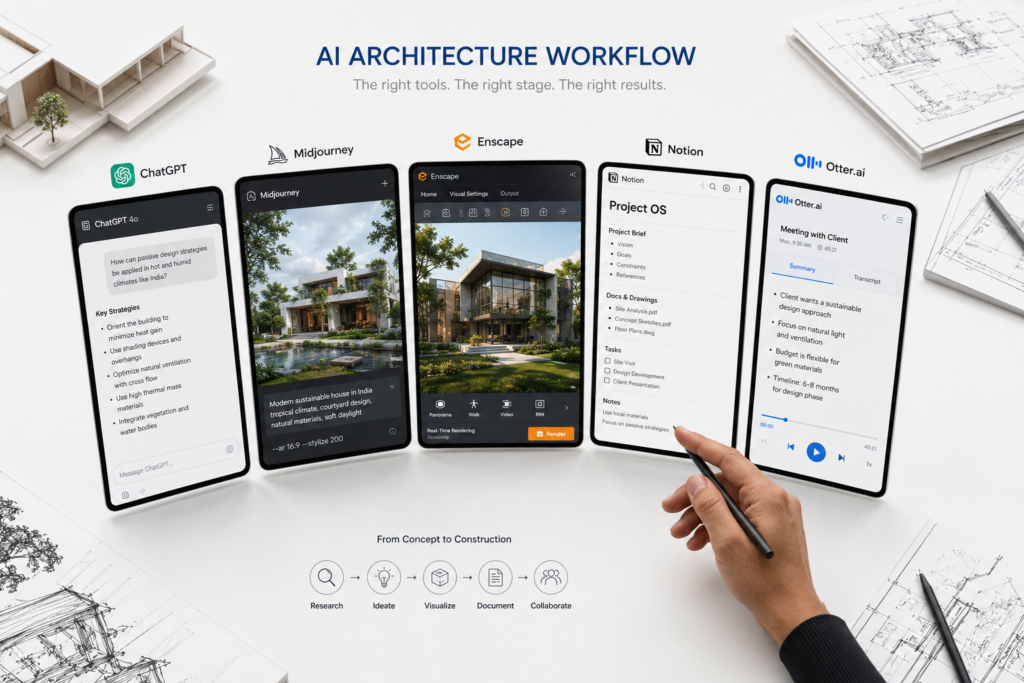
Individual AI tools are useful. A connected AI workflow is transformative. The difference between an architect who saves 2 hours a week with AI and one who saves 15 hours is workflow integration — knowing how tools pass information to each other and where AI sits in your project journey.
7.1 The Architect AI Stack
Think of your AI workflow as a stack with four layers. Each layer has specific tools and a specific function. The goal is to have at least one good AI tool at each layer before adding more.
| Layer | Function | Recommended Tools |
| Intelligence | Research and analysis | ChatGPT, Claude, Perplexity |
| Creation | Design and visualization | Midjourney, Veras, Vizcom, Forma |
| Documentation | Writing and records | Otter.ai, Notion AI, Copilot |
| Operations | Productivity and process | Motion, Zapier, Grammarly |
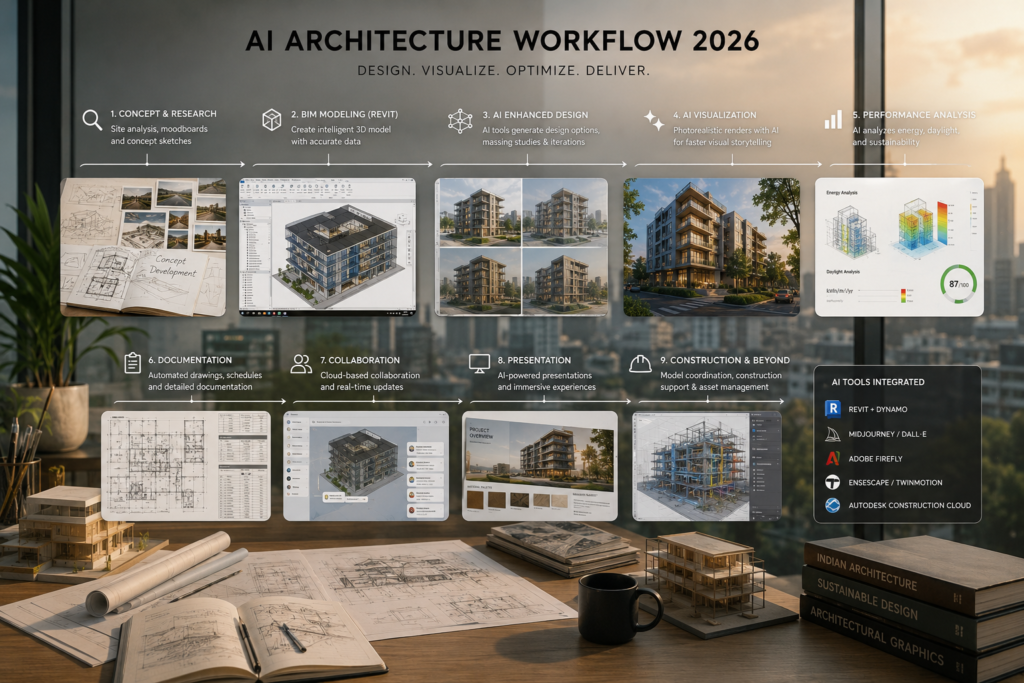
7.2 AI Workflow Diagram (Project Lifecycle)
Here is how AI tools map to a typical architectural project lifecycle from first client contact to handover:
💡 CALLOUT
AI WORKFLOW ACROSS THE PROJECT LIFECYCLE Stage 1 — Enquiry: Zapier (auto-response), ChatGPT (brief draft), Grammarly (proposal) Stage 2 — Research: Perplexity (site/regulations), Claude (precedents), NotebookLM (reference) Stage 3 — Concept: Midjourney (mood), Vizcom (sketch to render), Forma (massing) Stage 4 — Design: Veras/Enscape (renders), Lumion (presentation), Adobe Firefly (materials) Stage 5 — Documentation: ChatGPT (specs), Otter.ai (meetings), Notion AI (reports) Stage 6 — Construction: Archistar (compliance), Acrobat AI (contract review), Loom (site comms)
7.3 Integrating AI into BIM Workflows
The most powerful AI integrations in 2026 connect directly to your BIM software. Veras sits inside Revit. Autodesk Forma connects to Revit and Dynamo. Enscape is a plugin for Revit, SketchUp and Rhino. The principle is to minimize the number of times you export data between platforms. Every export is a point of error and a point of time loss.
✅ TIP
Map your current software stack on paper before adding AI tools. For each AI tool you consider, ask: does it connect directly to my existing software or does it require a separate export step? Prefer tools that integrate.
7.4 Building a Team AI Protocol
If you work with a team, creating a shared AI protocol matters. This document defines: which AI tools are approved for use, what prompts work best for your common tasks, how AI outputs are reviewed before use, and which tasks AI is NOT to be used for (client-sensitive communication, structural calculations, compliance decisions). Firms in Japan and South Korea have formalized this into studio-wide AI usage policies.
7.5 Measuring Your AI ROI
Track the time you spend on four categories each week: research, visualization, documentation, and administration. After one month of AI tool use, measure again. Most architects report a 30–50% reduction in time spent on documentation and research tasks. Use that data to make the business case for AI investment to your principal or firm owner.
Section 8: Ethical Use of AI
AI tools raise genuine ethical questions for architects. These are not hypothetical — they are already shaping professional reputation, client relationships and regulatory debate in every major market.

8.1 Authorship and Creative Credit
When AI generates design options, who is the author? Professionally and legally, you are. AI tools are instruments — like CAD software or a pencil. The design decisions, the judgment calls and the responsibility remain with the registered architect. In the UK, RIBA has issued guidance stating that AI-generated designs submitted for planning must be disclosed as such. Similar guidance is emerging in India through the Council of Architecture.
8.2 Copyright and Training Data Concerns
AI image generators like Midjourney and Stable Diffusion were trained on billions of images, including copyrighted architectural photography. This creates an unresolved legal gray area. Until clearer law exists, best practice is to use AI images only as internal tools or clearly labeled concept visualizations — never as a final deliverable that could be mistaken for an original commission.
⚠️ WARNING
Do not use AI-generated images in award submissions, planning applications or client contracts without clearly labeling them as AI-generated concept visualizations. Misleading use of AI imagery is a professional conduct issue in several jurisdictions.
8.3 Client Disclosure and Transparency
Should you tell clients you used AI? Yes — proactively and positively. Frame it correctly: ‘We used AI tools to explore 30 massing options in the time it would traditionally take to develop two. This gave us confidence we found the best solution for your brief.’ AI increases the quality of your process. Clients who understand this value it.
8.4 Bias in AI Design Tools
AI tools trained predominantly on Western architectural datasets can produce biased outputs. Midjourney, for example, historically generated images dominated by European and North American architectural styles. Architects working in South Asia, Southeast Asia, the Middle East and Africa need to actively adjust prompts to reflect local context, materials and culture — and to critique AI outputs through that lens.
✅ TIP
When using AI image generators for projects in India, Southeast Asia or the Middle East, always include specific regional context in your prompts: materials, climate, cultural references and local architectural language. Generic prompts produce generic results.
8.5 Environmental Cost of AI
Large AI models consume significant computing energy. A single complex AI image generation query can consume as much electricity as charging a smartphone. At scale, across a studio, this matters. Architects committed to sustainability should factor AI energy use into their environmental practice — and advocate for AI providers to commit to renewable energy for their data centers.
Section 9: Common AI Mistakes Architects Make
AI adoption in architecture is moving fast — and with speed comes error. Understanding the most common mistakes before you make them will save you time, money and professional embarrassment.
9.1 Using AI Output Without Verification
AI tools hallucinate. They produce confident-sounding information that is factually wrong. This is particularly dangerous for building regulations, structural specifications and material properties. An architect in Kuala Lumpur reported receiving an AI-generated specification for a fire-rated partition that cited a product that did not exist in the Malaysian market. The spec was almost submitted to a contractor unchanged.
⚠️ WARNING
NEVER submit AI-generated technical content without verification by a qualified professional. This includes specifications, code interpretations, structural assumptions and material performance data. AI confidence does not equal accuracy. Always check.
9.2 Over-Reliance on Midjourney for Design
Midjourney produces beautiful images. Beautiful images are not architecture. A growing problem in student portfolios and speculative presentations is the use of AI-generated images as a substitute for rigorous design thinking. The images look resolved. The thinking behind them is not. Assessors and experienced clients increasingly recognize this pattern.
💡 CALLOUT
THE MIDJOURNEY TRAP Symptom: Your concept images look stunning but you cannot explain why the building works. Cause: AI imagery was used to reach a visual conclusion before the architectural logic was developed. Solution: Use AI images as provocations, not conclusions. Always build the logic that justifies the image.
9.3 Choosing Too Many Tools at Once
New AI tools launch every week. The temptation to test everything simultaneously is real — and counterproductive. Architects who try five new AI tools in one week master none of them. The tools that save time are the ones you know deeply. Choose one tool per workflow phase, master it over four weeks, then evaluate whether to add more.
✅ TIP
Use the 30-day rule: commit to one AI tool for 30 days before evaluating it or replacing it. Shallow testing produces misleading results. Deep use reveals real value.
9.4 Ignoring Data Privacy for Client Projects
When you upload client documents, project briefs, site plans or contract data to AI tools, you are sending that data to third-party servers. Most major AI providers — including OpenAI, Anthropic and Google — have enterprise plans with stronger data privacy protections. For sensitive client projects, always use enterprise plans or check the data usage policy before uploading confidential information.
9.5 Not Building a Prompt Library
Architects who get consistent, high-quality results from AI tools have something in common: a prompt library. They save the prompts that work — for site analysis, specification drafting, concept descriptions, client emails — and reuse them. Without a prompt library, you start from scratch every time and get inconsistent results. Building your prompt library is one of the highest-value investments in your AI workflow.
Section 10: Building Your AI Workflow
Everything in this guide points to one outcome: a personalized, repeatable AI workflow that makes you measurably more effective as an architect. This final section gives you the framework to build it.
10.1 The One-Tool-at-a-Time Principle
Start with the tool that addresses your biggest time drain. If documentation is consuming your week, start with Otter.ai and Notion AI. If client visualization is your bottleneck, start with Veras or Lumion. If research is where you lose days, start with Perplexity AI and Claude. One tool, mastered, delivers more value than five tools used occasionally.
10.2 Building Your Personal Prompt Library
Create a shared document — in Notion, Google Docs or Obsidian — where you save every AI prompt that works well. Organize it by workflow phase: Research, Concept, Visualization, Documentation, Communication. Share it with your team. A good prompt library is a competitive asset. It encodes your firm’s working knowledge into reusable instructions.
💡 CALLOUT
STARTER PROMPTS FOR ARCHITECTS Research: “Summarize the key climate design strategies for [climate type] in [region]. Include passive cooling, shading and ventilation approaches. Use examples from [Asia/Middle East/Europe].” Brief: “Draft a project brief for a [building type] for [client type] in [location]. Include: program requirements, site considerations, sustainability goals and design aspirations.” Specification: “Write a preliminary specification for [element] for a [building type] in [climate]. Include performance criteria, material options and sustainability considerations.” Client Email: “Draft a professional email to a client explaining a [design decision or delay]. Tone: transparent, confident, solution-focused.”
10.3 Tracking Your AI Time Savings
Set a baseline before you start. For one week, log how long you spend on: research, concept visualization, documentation and administration. After four weeks of AI tool use, log again. The difference is your AI dividend — the hours recaptured each week for higher-value work. Most architects who complete this exercise are surprised by the magnitude of the change.
10.4 Scaling AI Across Your Practice
Once you have a personal AI workflow that works, the next step is to systematize it for your team. This means: selecting approved tools, creating a training protocol, building a shared prompt library, and establishing review standards for AI outputs. Firms that do this effectively double their AI productivity within six months of team adoption.
⚠️ WARNING
Scale AI adoption gradually. Forcing the whole team to switch tools at once creates resistance and errors. Start with one or two early adopters, document what works, and let the results make the case for wider adoption.
10.5 Your AI Architecture in 2026 and Beyond
AI tools for architects will continue to evolve. The tools that exist today are not the tools that will dominate in three years. What remains constant is the skill of AI workflow thinking — the ability to identify where AI adds value, to integrate tools effectively, to verify outputs critically, and to retain your design judgment at the center of everything. That skill compounds. Invest in it now.
✅ TIP
Revisit your AI stack every six months. Tools improve rapidly. A tool that was inadequate when you tested it six months ago may now be the best in its category. Evaluate, not just once, but continuously.
30-Day Action Plan: Build Your AI Workflow
| Week | Focus | Daily Actions |
| Week 1 | Explore AI Research Tools | Day 1–2: Sign up for ChatGPT and Perplexity AI. Day 3–4: Run your current project research through both tools. Day 5–7: Log time savings and note what worked. |
| Week 2 | Test AI Rendering Tools | Day 8–9: Sign up for Veras trial and Midjourney. Day 10–12: Generate renders of a current project in both. Day 13–14: Compare quality, speed and workflow fit. |
| Week 3 | Integrate One AI Workflow | Day 15–17: Set up Otter.ai for client meetings. Day 18–19: Create a Notion AI project documentation workspace. Day 20–21: Test Zapier automation for one repetitive task. |
| Week 4 | Build a Repeatable AI System | Day 22–24: Compile your prompt library from the past three weeks. Day 25–27: Document your AI workflow for each project phase. Day 28–30: Share with one team member and review results. |
Frequently Asked Questions
The most common questions architects ask about AI tools, answered directly.
| Q1. Do I need coding skills to use AI tools as an architect? No. The vast majority of AI tools used in architecture require zero coding knowledge. ChatGPT, Claude, Midjourney, Lumion, Enscape and most productivity tools are designed for general use with simple interfaces. Stable Diffusion is an exception — it rewards some technical knowledge. Start with no-code tools and add technical tools only if you identify a specific need they solve. |
| Q2. Which AI tool should I start with as a complete beginner? Start with ChatGPT or Claude for research and writing tasks. These tools have the gentlest learning curve and deliver immediate, visible value on tasks you already do daily — drafting emails, summarizing documents, writing project briefs. Master one LLM before adding visual AI tools like Midjourney or Veras. |
| Q3. Is it safe to upload client project documents to AI tools? Check the data privacy policy of each tool before uploading any client-sensitive information. OpenAI, Anthropic and Google all offer enterprise plans with stronger data protection. For confidential projects, use enterprise accounts or keep sensitive details out of prompts. As a rule: if you would not email that information to a stranger, do not upload it to a public AI tool. |
| Q4. Will AI replace architects? No. AI will replace architects who do not use AI tools — the same way CAD replaced architects who refused to use computers. The skill of interpreting human needs, navigating complex site contexts, and making ethical design decisions remains uniquely human. AI amplifies the impact of good architects and exposes the limitations of weak practice. |
| Q5. How much do these AI tools cost? Most tools offer free tiers that are adequate for getting started. ChatGPT Plus costs approximately USD 20/month. Midjourney starts at USD 10/month. Veras offers a free trial. Lumion and Enscape are annual subscriptions, typically USD 1,500–2,500/year for professional licenses. A fully equipped AI stack covering all workflow phases typically costs USD 100–200/month for a solo practitioner. |
| Q6. Can I use AI-generated images in planning applications? This varies by jurisdiction. In the UK, planning authorities require accurate representations of proposed development. AI-generated concept images that do not accurately represent dimensions, materials and context can lead to planning complications. Always label AI-generated images clearly and consult your planning authority’s policy before including them in formal applications. |
| Q7. How do I explain AI use to clients who are skeptical? Frame AI as a quality tool, not a cost-cutting shortcut. Say: ‘AI tools allow us to explore more design options in the concept phase than would be possible with traditional methods. This means you get a better-resolved design, not a faster one.’ Most clients respond positively when AI is presented as a means of improving their outcome rather than reducing your effort. |
| Q8. What is the biggest mistake architects make with AI? Using AI output without critical review. AI tools produce confident output regardless of accuracy. The biggest mistake is trusting that confidence and passing AI-generated specifications, descriptions or analysis to clients or contractors without professional verification. AI is a first draft machine. You are the editor, the critic and the professional of record. |
Key Takeaways
AI tools for architects are no longer optional — they are a competitive advantage in 2026.
The biggest time savings come from AI applied to rendering, documentation and research, not design.
You do not need to learn coding to use most architecture AI tools effectively.
The best AI workflow combines multiple specialized tools, not a single all-in-one app.
Ethical AI use requires transparency with clients and careful attention to intellectual property.
Architects who adopt AI strategically report saving 8–15 hours per week on average.
Start small: master one AI tool per week before expanding your stack.
AI enhances your design judgment — it does not replace it.
Continue Exploring
Deepen your AI architecture knowledge with these ARCNET.STUDIO resources.
| 💬 ChatGPT Workflows for Architects Step-by-step prompt workflows for every architectural task — research, briefs, specs, and client communication. | 🎨 Coming Soon – Best AI Rendering Tools Compared A detailed head-to-head comparison of Veras, Enscape, Lumion and Stable Diffusion for professional architectural practice. |
| ⏱️ Coming Soon – AI Tools That Save Architects Time The 10 highest time-saving AI applications in architecture, ranked by weekly hours saved. | 📐 Revit Learning Roadmap for Beginners Build your Revit skills from zero to professional in 90 days with ARCNET’s step-by-step roadmap. |
| 🗂️ Ultimate Architecture Workflow Toolkit The complete guide to building a systemized, scalable architectural workflow for solo practitioners and firms. | 📄 50 AI Tools Directory (Download) The complete reference directory of 50 AI tools for architects — categorized, rated and explained. |